
Run SharePro from anywhere
The Work from Home setup adds one server to your existing infrastructure — your team gets full SharePro access from any location.
- Servers (or fewer)
- 3
- Feature parity
- 100%
- Remote access
- 24×7
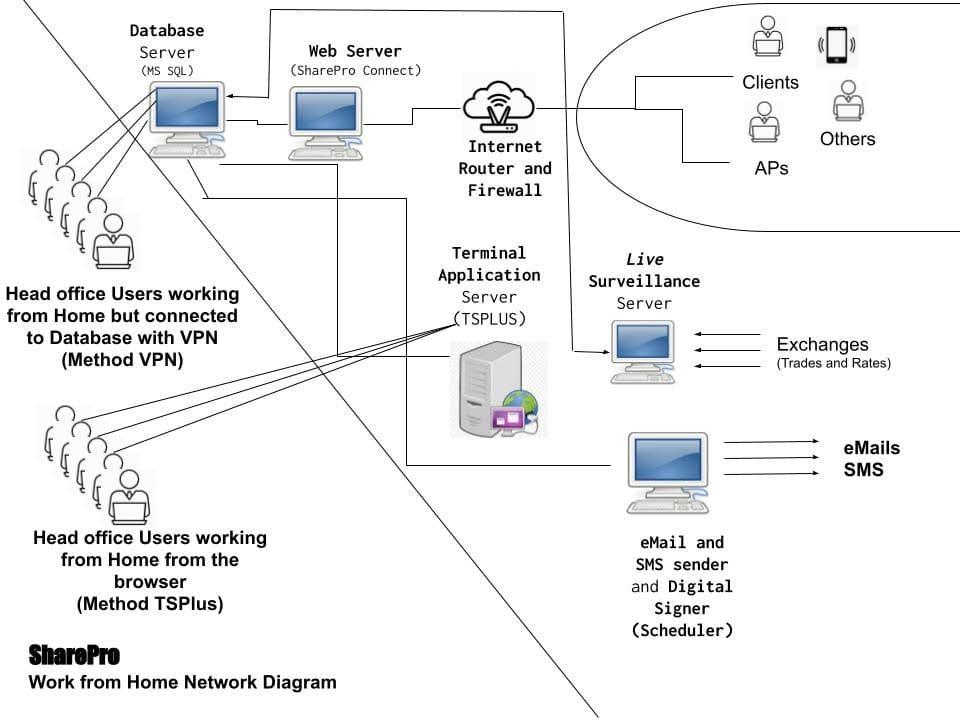
Not all that different from what you have today
Your existing Database and Web Server stay as they are. One additional Terminal Application Server is all it takes.
Database Server
Accessible by your backoffice users — same as your current setup.
Web Server
Serves your global users — no change required.
Terminal Application Server
SharePro Desktop [EXE] is installed here. Multiple users are created and given access with different access levels.
Flexible deployment
The three servers can be rolled into one or two depending on your volumes and data pressure.
TSPlus — secure Remote Desktop on the Application Server
We recommend installing TSPlus on the Terminal Application Server. Several users access SharePro simultaneously with different access levels. Two ways to connect:
Common questions
You need a Terminal Application Server where SharePro Desktop is installed. This can be a dedicated machine or combined with your existing Database or Web Server depending on volumes.
Either through their web browser or via a TSPlus floating panel shortcut on their desktop — both give full access to SharePro.
Yes. TSPlus lets you create multiple users on the application server, each with their own access level and assigned applications.