
Moving to SharePro, without the dread
“In all probability, you have already lived through the hell of a migration. This document is here to allay your fears.”
StanSoft migration team
The questions on your mind
The honest answers, up front.
Yes. Most of our clients have migrated from other systems — in fact, from almost every back-office system available in the country. We have vast experience in how to migrate and already know the difficulties we may face. Over the years, StanSoft has built a library of migration tools that let us shift clients across quickly. If we have already migrated someone from your back-office system, you're in luck: your migration won't need the discovery process of studying your existing system's data structures.
In most cases, yes. But remember that our migration tools are built on a need basis. If you use extra functionality in your existing back-office that earlier users didn't, we may need to extend the migration tool a little more.
No. Most of the migration is automated, but parts of it — like account-head mapping — are done manually, so it needs full involvement from both our team and yours. Migration is often a hard, frustrating process that needs rechecks and revisions. But relax: our tools migrate incrementally, so they can be run repeatedly until the final switch-over date.
The migration process
Done step by step, with each stage carrying its own significance.
1. Preliminary migration
We establish a secure VPN connection to your SharePro databases and to your existing back-office databases (or their copies). If one isn't already available, a migration tool is programmed. Data is then migrated from your existing system into SharePro.
2. Parallel run
You run random accuracy checks and parallel runs — processing day trades, running brokerages, generating contracts and printing reports — and match them against your existing system. With both teams involved, we compare in as much depth as possible.
3. Final migration
You continue the parallel run as long as possible, with our support team on hand. A few days before the final migration date, our team connects and migrates the data one last time.
4. Handholding
Crunch time. From here, our team helps you run the actual processing — payins, payouts and more — in SharePro, walking you through every step in the live environment.
The cut-off date
A pre-decided date on which we make the final switch from your existing back-office to SharePro. Most data is migrated as on the cut-off date minus one. For that financial year, client reports come partly from the earlier system and partly from SharePro — though it sounds disadvantageous, this is often the only kind of migration possible.
Client master
Name, address, registration details, PAN, passport, bank details, DP details, and so on.
Brokerage settings for clients / baskets
Complete settings for delivery, trading, daily 1, daily 2, futures, options and expiry — including specific brokerages at instrument or underlying level.
Branches
Branch list with addresses, mapped to clients.
AP / dealer / RM / family groups
List of APs, RMs and the like, with addresses and other information, along with their client mapping.
AP commission settings
Segment-wise sharing and commission settings.
Account heads
Your existing balance sheet is mapped to new structured account heads, organised between general and sub-ledgers. This mapping is done manually by our experts with your accounting team, and account heads are migrated based on it.
Account balance migration
Based on the account-head mapping above, the balances of all account heads — clients, banks and others — are migrated from the old system to the new.
Stocks in margin accounts
Client shares lying with you in margin accounts, and stocks in the Pro beneficiary account, are migrated into the new system.
Derivative, currency & commodity net open positions
These are not migrated directly. Instead we generate them — either by importing position files, or by processing actual trades of the last 3–4 months for the unexpired contracts.
DP charge baskets & charge settings
DP-segment charges and their mapping to clients are migrated from XLS sheets generated by your existing system.
DP client master, POA master & signatures
Imported fresh from the files available in the depository system.
DP slip inventory & used slips
The stock of DP slips, with details of used slips, is migrated from XLS sheets generated by the old system.
Ledger balances in the DP system
Usually migrated from ASCII reports generated by your existing system; if database connectivity is available, optionally migrated by code.
Pledged stocks (PSN-wise)
We take the opening stock of pledged securities PSN-wise and bring them into the system.
Can we migrate data from the 1st of April?
Yes — it's possible, albeit with a little more hard work. A back-office system holds far more than trades: it is the sum of hundreds of activities — trades, contracts, charges, payins, payouts, exchange reportings, client reportings, VARs, closing rates, quarterly settlement records, DP slip issues and more. Porting everything exactly as-is is extremely difficult, if not impossible. As a fix, certain information can be migrated (at an extra cost) so a client doesn't have to switch systems to get full-year reports.
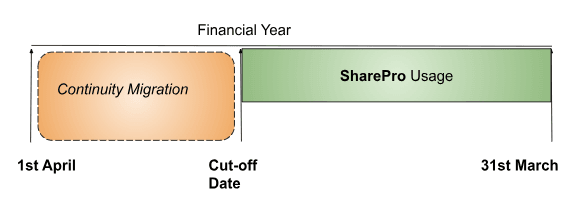
What can be migrated optionally
Migrated at an extra cost, to keep continuity for full-year reports.
Raw trades
Raw trades in all segments are migrated into SharePro from 1st April onwards, which makes reports like LTCG meaningful. Note: back-dated contracts may still not be printable from SharePro.
Raw ledger entries
Entries as currently reflected in your books are migrated as-is, with no calculations re-run. Based on the account-head mapping above, bank books and journals come across as-is.
Contract-note information with charges
Individual contract-note charges and numbers, with contract-wise and segment-level charges, may also be migrated — depending on how the data is stored in your existing system.
Inspections
Can I get through inspections using data migrated from before 1st April?
No. An inspection team can ask for countless combinations of information that may not be possible to migrate. For example, they may want to verify the value of collateral uploaded in margin reporting as on a given date — and that may not be available from the migrated data.